This article will explain how to use the Maxmod Utility to convert audio files into the format supported by Maxmod.
Notes about composing music
When you play music with Maxmod, it may not sound the same way as when you were composing it. Maxmod doesn't do any interpolation on the output, but interpolation is usually enabled in module trackers used for composing music. If you want an output closer to what the GBA would actually sound like, you need to disable interpolation and filtering.
For example, in OpenMPT you need to go to View > Setup. Select the Mixer tab and change the interpolation mode to "no interpolation", as well as set volume ramping to 0:
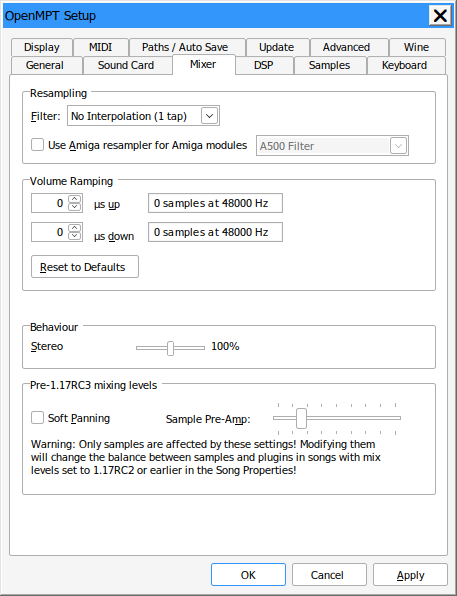
Correct mixer settings for OpenMPT
Introduction to mmutil
Run mmutil without any arguments to bring it up.
******************
* Maxmod Utility * v1.22.0
******************
Usage:
mmutil [options] input files ...
Input may be MOD, S3M, XM, IT, and/or WAV
.------------.----------------------------------------------------.
| Option | Description |
|------------|----------------------------------------------------|
| -o<output> | Set output file. |
| -h<header> | Set header output file. |
| -m | Output MAS file rather than soundbank. |
| -d | Use for NDS projects. |
| -b | Create test ROM. (use -d for .nds, otherwise .gba) |
| -i | Ignore sample name flags (NDS mode only). |
| -v | Enable verbose output. |
| -p | Set initial panning separation for MOD/S3M. |
| -z | Export raw WAV data (8-bit format) |
| -V | Print version string and exit. |
`-----------------------------------------------------------------'
.-----------------------------------------------------------------.
| Sample flags |
|-----------------------------------------------------------------|
| Sample flags are strings added to a sample name to modify the |
| sample during conversion. The only work in NDS hardware mixing |
| mode. |
|-----------------------------------------------------------------|
| %o: Used to support the `9xx` command when using the DS |
| hardware channels for playback. In MOD/XM (maybe others) |
| you can use a sample offset command to start playing beyond |
| the loop start, and then when the sample hits the loop end |
| it'll still correctly loop back to the start. |
|-----------------------------------------------------------------|
| %c: Compress the sample using IMA-ADPCM. This only works on NDS |
| in hardware mixer mode. |
`-----------------------------------------------------------------'
.-----------------------------------------------------------------.
| Examples: |
|-----------------------------------------------------------------|
| Create DS soundbank file (soundbank.bin) from input1.xm |
| and input2.it Also output header file (soundbank.h) |
| |
| mmutil -d input1.xm input2.it -osoundbank.bin -hsoundbank.h |
|-----------------------------------------------------------------|
| Create test GBA ROM from two inputs |
| |
| mmutil -b input1.mod input2.s3m -oTEST.gba |
|-----------------------------------------------------------------|
| Create test NDS ROM from three inputs |
| |
| mmutil -d -b input1.xm input2.s3m testsound.wav -oTEST.nds |
`-----------------------------------------------------------------'
Let's pretend we have 4 music files named song1.mod, song2.s3m, song3.xm, and song4.it. Let's also throw in a couple sound effects too: sound1.wav and sound2.wav. Produce a soundbank file like this:
mmutil -osoundbank.bin -hsoundbank.h -d song1.mod song2.s3m song3.xm song4.it sound1.wav sound2.wav
You should now have soundbank.bin which is the actual soundbank file, and soundbank.h which contains the C/C++ definitions for your project. Notice that the -d option was specified. This makes the output suitable for a DS project, but not for GBA. Remove the -d flag for GBA projects.
Header Output
The utility generates a C/C++ header file with all the definitions for the soundbank file. Module definitions will be prefixed with MOD_. Sample definitions will be prefixed with SFX_. The module definition name will be constructed using the filename of the module. Sample definitions will be constructed with either the filename, sample name, or DOS filename. For WAV files, the sample definition will use the filename (sample1.wav will become SFX_SAMPLE1). For MOD/XM, the definition will use the sample name. For S3M/IT modules, the sample definitions will be constructed using the DOS filename. The beginning of the sample name (or DOS filename) must begin with '#' to produce a definition. Any errornous characters will be converted to underscores.
The example shown above should produce a header file similar to this:
#define MOD_SONG1 0
#define MOD_SONG2 1
#define MOD_SONG3 2
#define MOD_SONG4 3
#define SFX_SOUND1 0
#define SFX_SOUND2 1
#define MSL_NSONGS 4
#define MSL_NSAMPS 46
#define MSL_BANKSIZE 50
ROM Output
To make a test ROM with a certain module, use the -b option. This will produce a GBA image that features the song listed.
mmutil -b test.xm test2.xm -oMyTestROM.gba
To make a DS image, specify the -d option too.
mutil -b -d test3.it test6.it sound1.wav sound2.wav -oMyAwesomeTestROM.nds
You should now have either have a GBA or NDS file depending on the -d flag.